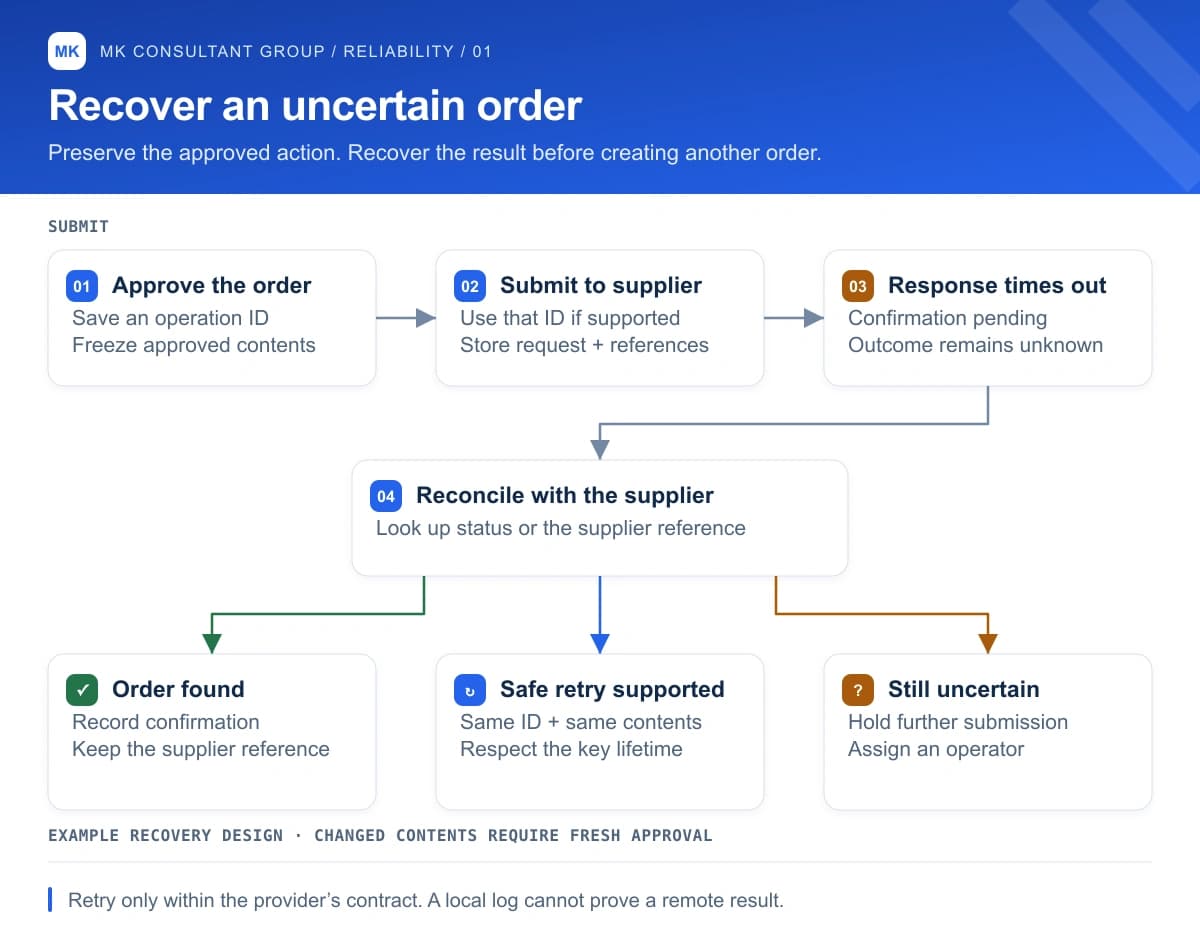
Consider a hypothetical purchasing assistant. An operator approves an order, the assistant submits it, and the supplier's system creates it. Then the connection drops before the confirmation comes back. The operator sees a spinning indicator. The supplier sees an order. What should happen when someone clicks Retry?
A timeout leaves the outcome uncertain. Repeating a request that changes another system can repeat the action. AWS describes this problem in its guidance on idempotent APIs: the caller needs a way to recover without accidentally creating another resource. AWS: making retries safe
Give the approved action an identity
A caller-provided request identifier lets a service recognize another attempt at the same operation. Identical parameters alone cannot establish intent; a customer might genuinely want two identical orders. AWS recommends making that intent explicit through a unique request identifier. AWS: request identifiers and intent
For the purchasing example, I would create that identity when the operator approves the order and preserve the approved contents with it. A retry would refer to that record. Editing the quantity would send the order back through review. That gives the operator a useful distinction: resume the approved purchase, or approve a different purchase.
Read the provider's retry contract
Stripe offers a concrete example. Its API accepts idempotency keys for POST requests and returns the saved status and response for subsequent requests with the same key, including a saved 500 error. It rejects a reused key with different parameters. These details determine what a recovery process can safely do. Stripe: idempotent requests
There is also a retention boundary. Stripe says keys can be removed once they are at least 24 hours old; reusing a pruned key creates a new request. A job resumed several days later needs to account for that. Other providers have their own rules, so check the particular endpoint before promising safe retries.
Make uncertainty visible to the operator
In the example, I would show an explicit status: confirmation pending. The order screen would retain the approved quantity, the last submission attempt and any supplier reference received. The recovery path would look up the supplier's record when the integration supports it. If the result remains ambiguous, the screen would assign someone to investigate before another purchase is submitted.
That is a product decision as much as an engineering decision. Who owns the unresolved order? Can the buyer keep working on something else? Does the morning queue distinguish orders awaiting confirmation from orders nobody has submitted? Those questions belong in the design review, because someone will have to answer them during an outage.
Ask for the interrupted demo
Before approving this workflow for production, I would ask the team to demonstrate the hypothetical failure in a test environment: let the supplier accept the order, then interrupt the response. Resume the workflow and inspect the supplier's records. Repeat the exercise after restarting the worker. The review should establish what happened to the order and what the operator sees, including any case the integration cannot resolve automatically.
Bring that scenario to your next AI workflow review. Ask the person running the demo to recover the order using the same screen an operator would use. If they need to inspect a database manually, put that recovery work into the launch plan and name its owner.